This page provides information on the types of exhibition nights we hold, along with:
- image categories,
- image sizing,
- export settings,
- titling your image(s) for submission into our Open exhibition nights
- titling your image(s) for submission into our Open and/or Set exhibition nights
- submitting your images, and
- print presentation requirements for exhibiting prints.
Types of Exhibition Nights
Our exhibition nights use the following category structures:
- Open – To encourage creative freedom and diverse photographic exploration, members can submit up to three images on any subject of their choice as either print or as a DPI (Digital Projected Image)
- Set – To challenge photographers to think creatively within specific constraints and develop new skills, members can submit up to three images that respond to the predefined photographic subject or particular topic, as either print or as a DPI
- Open and/or Set – combines the previous categories listed above. This hybrid approach to our exhibition nights allows members to pursue creative freedom while challenging themselves with the Set subject or topic. Members can submit up to three images that respond to either the Open category and/or the Set predefined photographic subject or particular topic, as either print or as a DPI.
All submissions must meet the club’s code of conduct policy.
Image categories for all Exhibition Nights
All our Exhibition nights include three primary image categories as follows:
- Digital Projected Image – [DPI] – includes both colour and monochrome images
- Colour Print – [CP]
- Monochrome Print – [MP]
NOTE: The recognised definition of monochrome, according to the Federation of Camera Clubs of NSW (FCC), is:
“A photograph developed or executed in Black and White or varying tones of only one colour.” So that could be all greens, all blues, sepia etc.)
Currently a total of three images can be submitted. These could all be in one category or spread across two to three categories.
Sizing your images
Images must be submitted in JPG (jpeg) format and have specific dimension requirements as below:
- Landscape images – 1920 pixels on the long edge (width) x 1200 on the short edge (height).
- Portrait images – 1200 pixels on the long edge (height).
- Square images – 1200 pixels x 1200 pixels.
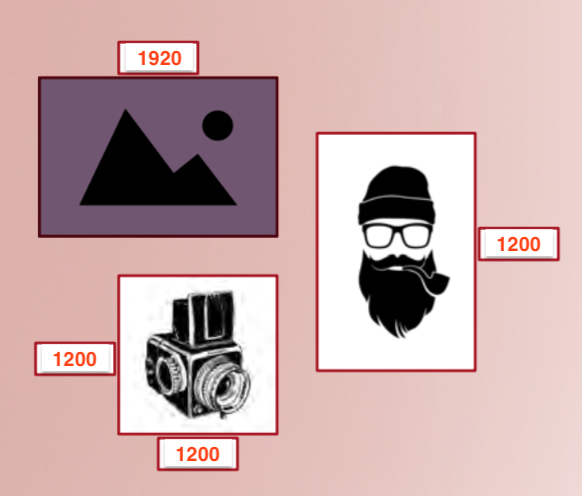
Images must not exceed the dimensions outlined above. If in doubt, use the rule of thumb that the height of your image, irrespective of shape, should not exceed 1200 pixels. The only exception is when using aspect ratios of 1:2 or 1:3 ratios for landscape images, in these cases the long edge should not exceed 1920 pixels.
If you are exhibiting PRINTS you must also submit your print images as DPIs prepared as described above.
Image export settings
When exporting your images from your preferred editing software, the following settings are advised:
- Colour Space – set to sRGB.
- Image Quality – set quality to maximum.
- Image File Size – up to but not exceeding 2Mb (2000Kb)
File naming conventions – Open
When naming your file for submission for Exhibition nights that have no ‘Open or Set’ subject or topic nominated, the following details need to be included:
- Type of Image – the category your image is being entered into [Type of image], enclosed in square brackets, followed by a space.
- Title of your image – do not use full stops or underscores when titling your image. Use spaces between words in your title, followed by an underscore not a hyphen.
- Author’s Initials – your initials in capitals, e.g. initials of your first name and last name only, unless advised otherwise by the club
- JPG file extension – You do not need to add this; it will be included when you save the file.
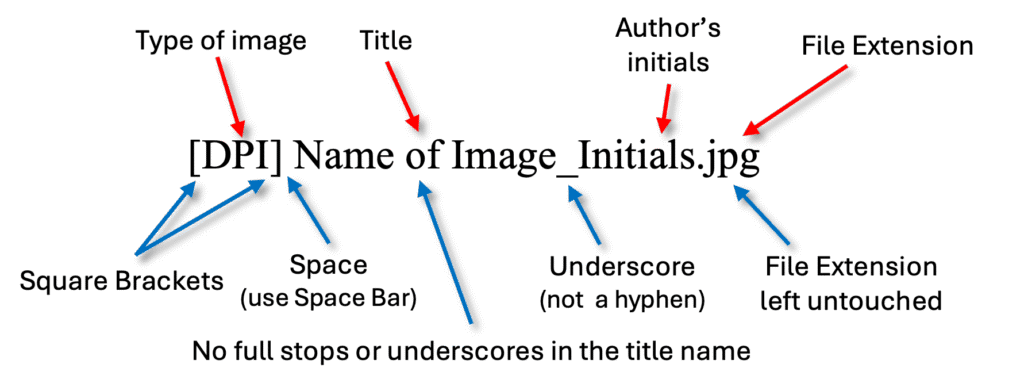
The following are examples for each competition category:
- [DPI] Brilliant Sunrise_AB.JPG
- [CP] Brilliant Sunrise_AB.JPG
- [MP] Brilliant Sunrise_AB.JPG
Please check all of the details are correct before submitting them via email.
File naming conventions – ‘Open and/or Set’ Exhibition nights
When naming your file for submission for Exhibition nights that have a Set and an Open category as an alternative, the following details need to be inlcuded:
- Type of Image – the category your image is being entered into [Type of image], enclosed in square brackets followed by a space.
- Title of your image – do not use full stops or underscores when titling your image. Use spaces between words in your title, followed by a space.
- Open or Set subject or topic – the subject or topic you are entering into – use capital ‘O‘ for the Open category, or capital ‘S‘ for the set subject or topic, followed by an underscore not a hyphen.
- Author’s Initials – your initials in capitals, e.g. initials of your first name and last name only, unless advised otherwise by the club
- JPG file extension – You do not need to add this; it will be included when you save the file.
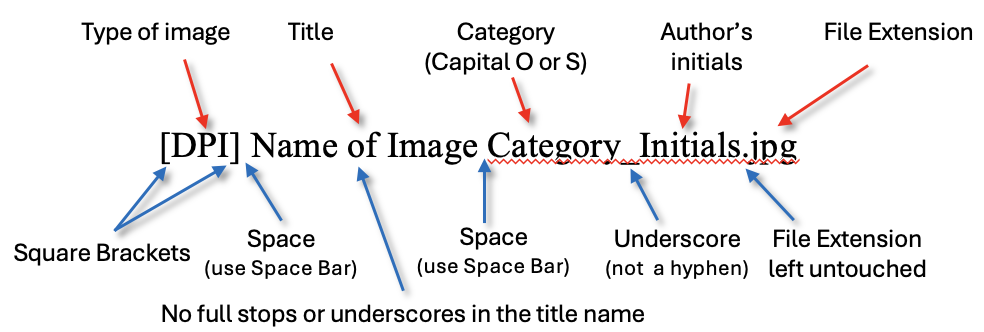
The following are examples for each competition category:
- [DPI] Brilliant Sunrise O_AB.JPG
- [DPI] Brilliant Sunrise S_AB.JPG
- When submitting an image for ‘Open’, after the Title/name of image leave a space then type O. Do NOT use any full stops or hyphens.
[DPI] Brilliant Sunshine O_AB.JPG - When submitting an image for a ‘Set subject’, after the Title/name of image leave a space then type S. Do NOT use any full stops or hyphens.
[DPI] Brilliant Sunshine S_AB.JPG
The same titling of the image file applies if you are entering a colour or mono print.
- [CP] Brilliant Sunrise O_AB.JPG
- [MP] Brilliant Sunrise S_AB.JPG
Please check all of the details are correct before submitting them via email.
Submitting your images
Your images should be emailed as attachments*, all in one email, no later than THURSDAY EVENING (Midnight Australian Eastern Standard Time (AEST), or Australian Eastern Daylight Time (AEDT)) before the club’s monthly Exhibition Night, which is held on the first Monday of every month.
Email submissions to the club DPI email address ubmcc.dpi@gmail.com
Please ensure that your email program doesn’t automatically reduce the size of your attached images even further in the mistaken belief that it is helping you. (* ✉︎ Apple Mail users – please ensure you select — Image Size: Actual Size)
The DPIs of your prints need to be prepared and emailed following all the instructions and timelines above.
You will receive an automated reply that your email has been received.
Prints
Prints must be neatly framed in a mat board no larger than 40cm x 50cm. The TITLE and your NAME must be written on a sticker on the back of your print.
On the evening of the exhibition night, please arrive at Katoomba RSL between 7.00 and 7.15pm to set up your prints on the colour and monochrome display boards.
Then you can mingle, perhaps with a beverage of your choice, and be ready to sit back, relax and enjoy the evening’s entertainment which starts promptly at 7.30pm!